// cheat code 06  ·  happies  ·  the brand build  ·  checked aug 27, 2026

How I built Happies in a day.

Happies is a dog-treat brand that doesn't exist. I made it up to learn the workflow, then ran it like a paying client. This is every step, in order, with the exact sentences I typed, so you can do the same thing for your own idea this weekend.

9 steps1 afternoon for the lockClaude $20 plan + a Higgsfield accountabout 140 credits, all in
// read first

Three things before you start.

What you need

Claude on the $20 plan (Claude Design lives there). A Higgsfield account with some credits for the pictures. A folder on your computer. That's it. No design background. I don't have one.

The one rule

No face, no pictures. Until the look is locked in Claude Design, the image tools make nothing. Every time I broke this rule it cost credits and I threw the result away.

What it cost

The lock itself is free (it's inside your Claude plan). The pictures on this page ran about 140 Higgsfield credits across two days, including everything for the website. Every batch is in a cost sheet. Real numbers only.

01Grill 02Pictures 03The lock 04The folder 05Character sheet 06The thing inside 07Fit 08Books 09What's next
012 MINUTES · 0 CREDITS

Grill yourself for two minutes.

// what this step gives youSix answers, not a brand book. That's enough to start, and more than most companies have.
// what I didI answered six questions, out loud, fast. Person, pain, promise, one product, three brands whose look I'd steal, and the nevers. My first version of this asked about fonts and bag shapes in words. It died. You can't interview a font. You point at one.
// the six questions (answer in one sentence each)
1. Who buys it, in one sentence?
2. What do they hate about what they buy now?
3. What does yours do about that, in one sentence?
4. What is the ONE product we start with?
5. Name three brands whose look you'd steal from.
6. Anything we must never do?
// my six for Happies, so you can see the shape
1. A woman, 25 to 40, who treats her dog like her best friend. Brunch-coded. Buys things that look good on her counter.
2. Dog treats are ugly or vague about what's in them. Nothing she'd leave out on the counter.
3. Single protein, grass-fed, soft-baked, and shelfie-worthy. Flavors she'd order at brunch, safe for the dog.
4. Sunday Pot Roast. One flavor. The other four come later.
5. Chomps for the product, Bloom for the page, Olipop for the scroll.
6. Not a vet brand. Not clinical. No pink.

Save the answers as a text file called brand-positioning. You'll paste it into every tool from here on.

// you'll know it worked whenYou can say what it is and who it's for without looking at the file.
next: pictures ↓
0210 MINUTES · 0 CREDITS

Dump pictures, not words.

// what this step gives youThe prompt. Screenshots are the prompt. Everything Claude Design makes comes from what you put in this folder.
// what I didI made a folder called inspo and dropped in eleven screenshots: bags I liked, sites I liked, ads I liked. Then I wrote one line for each of three jobs. The product vibe from one brand. The page look from another. The scroll feel from a third. Three brands, three jobs, never mash them into one, and never copy a name or a logo.
// the three-axis note I keep with the screenshots
Product vibe: [brand 1]. Close, not a copy.
Page look: [brand 2]. Bright and fun. Inspiration only.
Scroll feel: [brand 3], for tempo.
Color words: [4 or 5 plain words, like "sunny yellow, clean white, metallic bag, near-black type"].
Nevers: [what it must not look like].

Ten minutes of dumping pictures and picking is the whole thing the client pays for. Don't let anyone talk you into "just describe it."

// you'll know it worked whenSomeone who's never seen your idea could look at the folder and say what it's going for.
next: the lock ↓
0310 MINUTES · 0 CREDITS

Lock the look in Claude Design.

// what this step gives youA wordmark, a palette, two fonts, and a flat drawing of the package. Picked by you, not described by you.
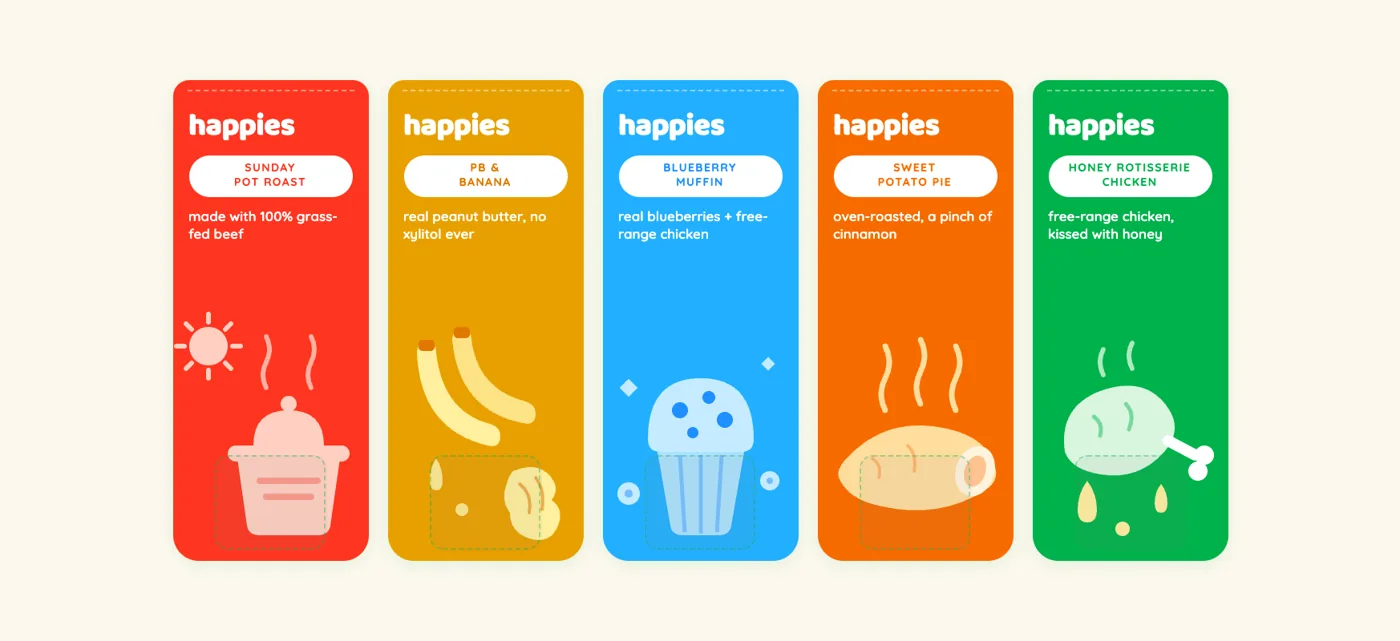
// what I didOpen Claude Design (claude.ai/design, or from the desktop app's sidebar). Attach the screenshots from the inspo folder. Paste one sentence. It came back with the wordmark, the colors, the type, and a flat front-of-pack for five flavors. I circled things on the canvas and said what was off, for about ten minutes, and it re-drew. Then I stopped. The stopping is the lock.
// the one sentence (fill the blanks from step 1)
[Brand] is [category] for [the person]. Make me a starter brand system: a wordmark, a palette, type, and one flat [package] design, that sits between [inspo brand A] and [inspo brand B]. [Two adjectives]. Never [the nevers].
The five flat Happies pouches as Claude Design drew them
the flat design Claude Design gave back. this drawing is what every picture after it obeys

Cheap image tools can't do this step. I tried, twice. They invent a logo that looks like every other logo. Claude Design turned my screenshots into a picked, coded brand in one shot, and that's the whole reason the rest of this works.

// you'll know it worked whenYou look at the flat drawing and don't want to change anything. That feeling is rarer than it sounds. Stop there.
next: the folder ↓
045 MINUTES · 0 CREDITS

Export the design system into one folder.

// what this step gives youA folder every AI tool reads the same way. Claude Code, Cowork, anything else. Same rules, no drift, no re-explaining.
// what I didClaude Design exports the design system as a folder: a readme with the voice and color rules, a tokens folder with the exact colors and fonts, guideline pages, and the flat package art. I dropped it, untouched, into a brand folder inside the client folder. Then I built the rest of the folder around it. Every agent that opens this folder reads the same law before it makes anything.
// the folder, copy this shape
happies/
  CLAUDE.md          what this client is, what to read first, the rules
  context/           brand-positioning.md (your six answers) · product-facts.md (what's real vs invented) · open-questions.md
  inspo/             the screenshots. this is the prompt.
  brand/             the Claude Design export, verbatim. never edit by hand.
  assets/            only pictures that passed review, each folder with a manifest.md that lists the file and its Higgsfield job id
  output/            ads/ social/ video/ web/ analytics/, dated subfolders per run
// the first line of CLAUDE.md
Read, in order, before making anything: context/brand-positioning.md, then brand/readme.md, then assets/*/manifest.md. If brand/ does not exist, make nothing but questions.

The export is the bridge. Claude Design is where a human picks. The folder is where the machines work. Neither one has to know what the other is doing, because the folder is the contract.

// you'll know it worked whenYou open a brand-new chat, point it at the folder, ask for a social post, and it uses the right colors and the right voice without you saying either.
next: character sheet ↓
052 CREDITS PER FLAVOR

Make the character sheet.

// what this step gives youOne picture of the bag from five angles, that every future picture copies from. This is how the bag never drifts.
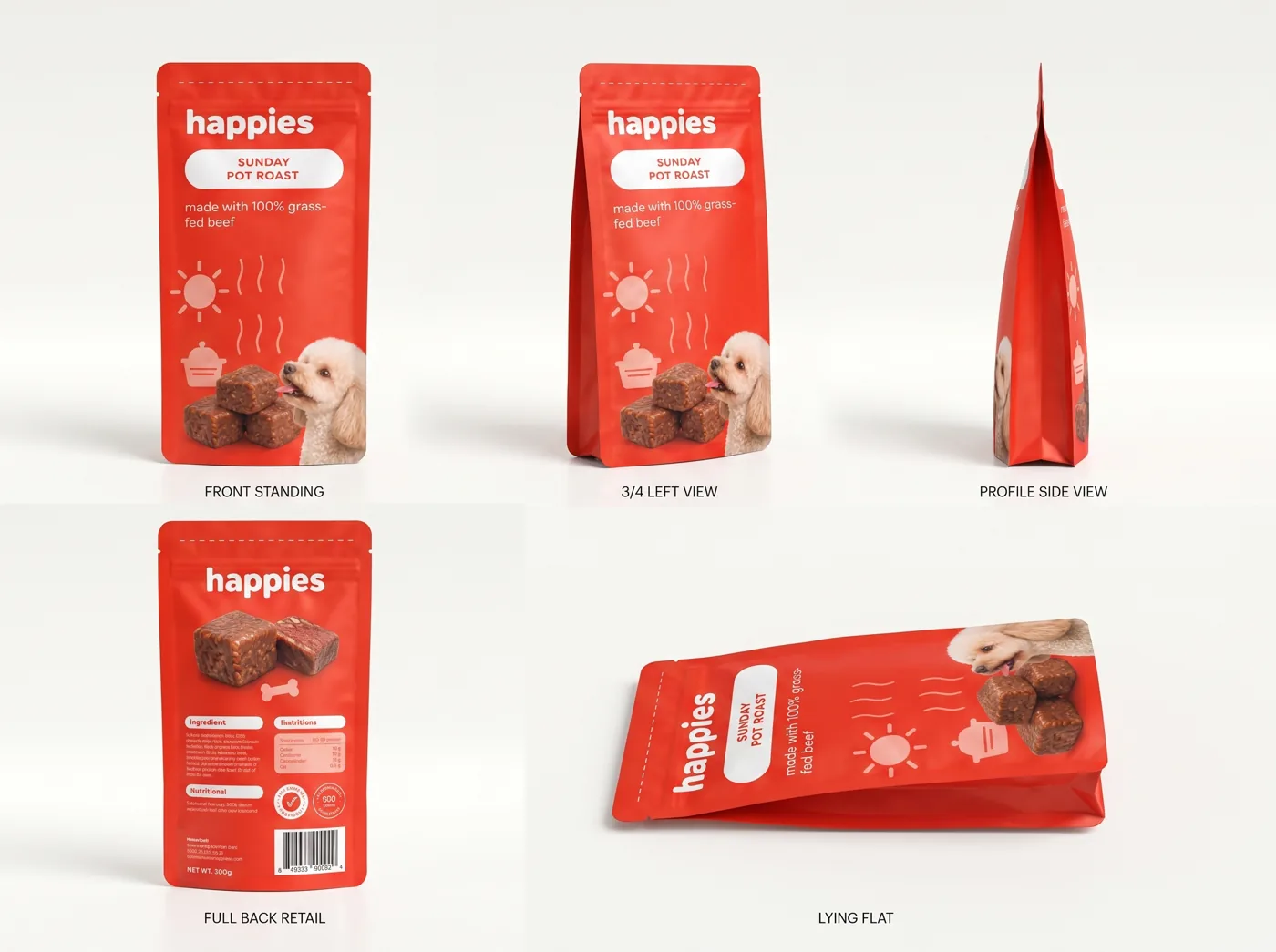
// what I didIn Higgsfield, with Nano Banana Pro, I handed it the flat design from Claude Design and asked for one sheet: the bag standing front, three-quarter left, side profile, full back with the retail panel, and lying flat. One flavor first, Sunday Pot Roast. Two credits. Then I did the same for the other four. The sheet's job id (Higgsfield's receipt number for the picture) goes in the manifest, and every picture after this passes that id as a reference.
// the sheet prompt shape
Product photography character sheet of this exact pouch design, five views on one clean light backdrop: front standing, 3/4 left view, profile side view, full back retail panel, lying flat. Matte soft-touch metallic stand-up pouch. Keep every color, word and mark exactly as the reference. Label each view.
Sunday Pot Roast pouch character sheet, five views
the locked pot roast sheet. every bag on the website was made from this

The flat design in, the photoreal bag out, and the bag says what the flat said. That's the magic of doing it in this order. Skip the flat and you get a different bag every time.

// you'll know it worked whenFive views, and the words on the bag match in every one. Read them. That's where it drifts first.
next: the thing inside ↓
062 CREDITS PER FLAVOR

Make the product sheet: the thing inside the bag.

// what this step gives youThe object itself, six ways. Macro, real texture, the kind of picture that makes someone hungry for dog food.
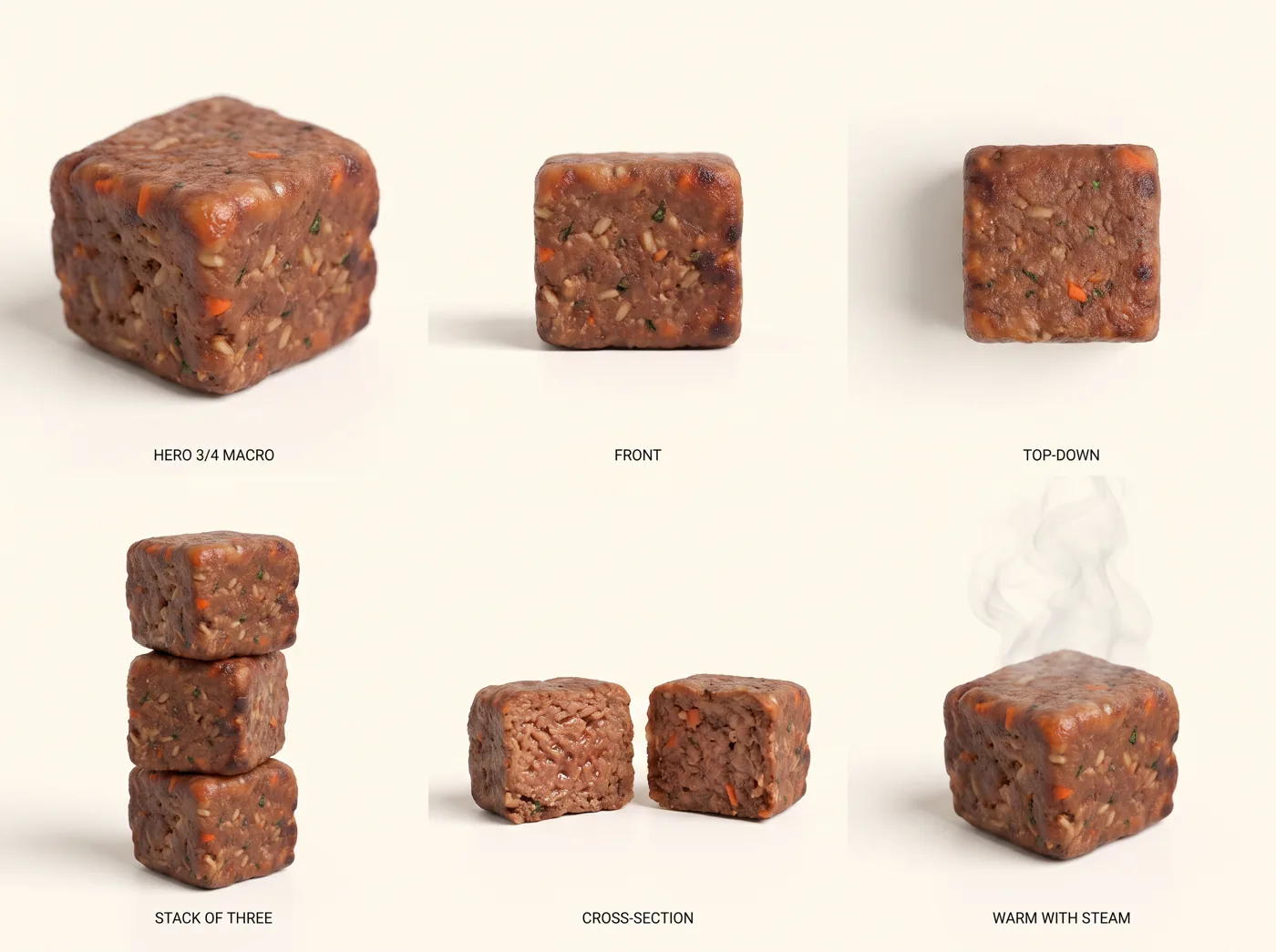
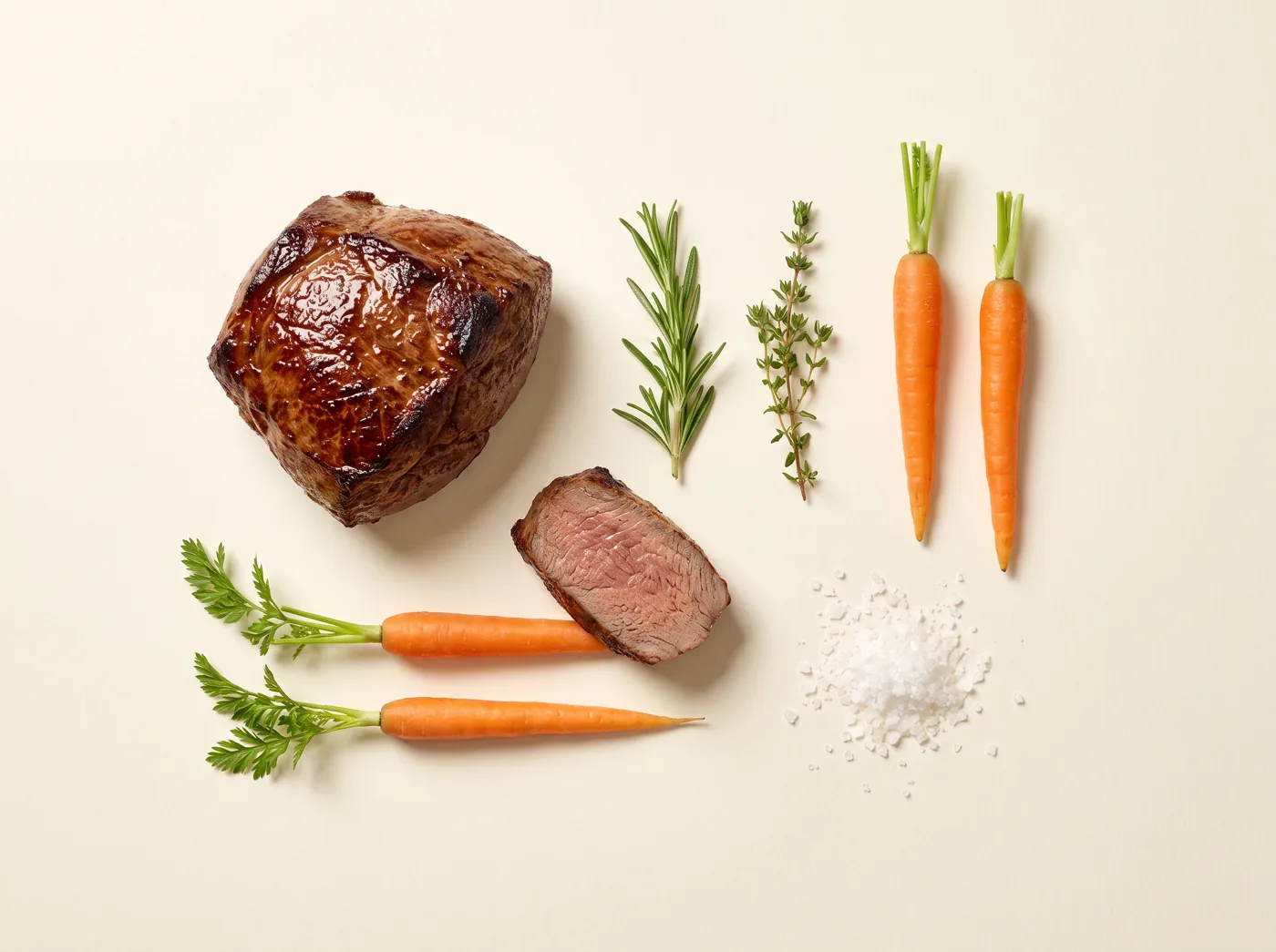
// what I didSame tool, same idea. A six-view sheet of the treat cube: three-quarter macro, front, top-down, a stack of three, a cross-section, and one warm with steam. I passed the bag sheet's job id as the reference so the color story matched. Then a prop sheet per flavor (the roast, the carrots, the rosemary) to use behind the product later. Object before scene: no dogs, no hands, no kitchens until the product itself passed.
// the product sheet prompt shape
Six-view product sheet of one soft-baked [product], real texture, macro, clean light backdrop, no packaging: hero 3/4 macro, front, top-down, stack of three, cross-section, warm with steam. Same color story as the reference. Label each view.
Pot roast treat cube sheet, six views
the cube sheet. the cross-section and the steam frame did most of the work on the site
Pot roast ingredient prop sheet
the prop sheet. one flavor's ingredients, cut into singles later
// you'll know it worked whenYou could crop any one view and it would pass as a real product photo.
next: fit ↓
070 CREDITS · SAVES ALL OF THEM

Look at every picture before anyone else does.

// what this step gives youThe habit that saves the credits. Reject the miss, recut, and never hand someone a bad one with an explanation.
// what I didEvery picture gets opened next to the flat design and the screenshots. Wrong color, wrong words, an invented logo, a different bag shape, pink: rejected, into a rejected folder with one line saying why, then recut. Real misses from Happies: a blueberry bag recut went navy and printed "22 oz" out of nowhere. The honey chicken bag copied the beef line from the pot roast bag. Both caught here, both thrown away, two credits each.
// the check, in order
1. Words on the pack: do they match the flat, letter for letter?
2. Colors: is that the flavor's field, or did it drift?
3. Shape: same pouch as the sheet?
4. Anything added? A logo, a badge, a claim you never wrote?
5. Would the person from step 1 post it?

The rule from the folder: never hand a miss and talk about it. Recut first. It's the difference between looking like a studio and looking like someone playing with an app.

// you'll know it worked whenNothing you've shown anyone has a typo on the bag.
next: books ↓
08EVERY BATCH

Write the cost line after every batch.

// what this step gives youReal numbers. Date, what it was for, which tool, how many, how many credits, what's left. Never a guess.
// what I didOne text file, one line per batch. On the first day I logged 7.5 credits and lost track of the rest, so the sheet says so instead of inventing a number. On the second day: five cube sheets 10 credits, five prop sheets 10, five solo bags 10, the transparent set 30, the spin clip 45. About 140 across the whole build, including the website.
// the line, copy it into a text file
date · step · flavor · tool · how many · credits · balance after · pass or rejected · where the files are

If you ever charge a client, this file is the invoice. If you never do, it's the thing that stops you from spending 400 credits on a bag you already had.

// you'll know it worked whenYou can say what the whole brand cost without opening the app.
next: what's next ↓
09THE PAYOFF

What one afternoon turns into.

// what this step gives youEverything after this is volume. Ads, carousels, a website, video, all from the same five sheets.
// what I didWith the sheets locked, every later picture references them, so the bag is the same bag in a tennis-court ad, a kitchen scene, a spinning video, and a website. The website took one more day and is its own guide (Happies, part two: the site and the scroll). None of it works without the boring steps above.
// the order, if you only remember one thing
Grill → pictures → lock in Claude Design → export to the folder → character sheet → product sheet → review → books. Then, and only then, ads and a site.
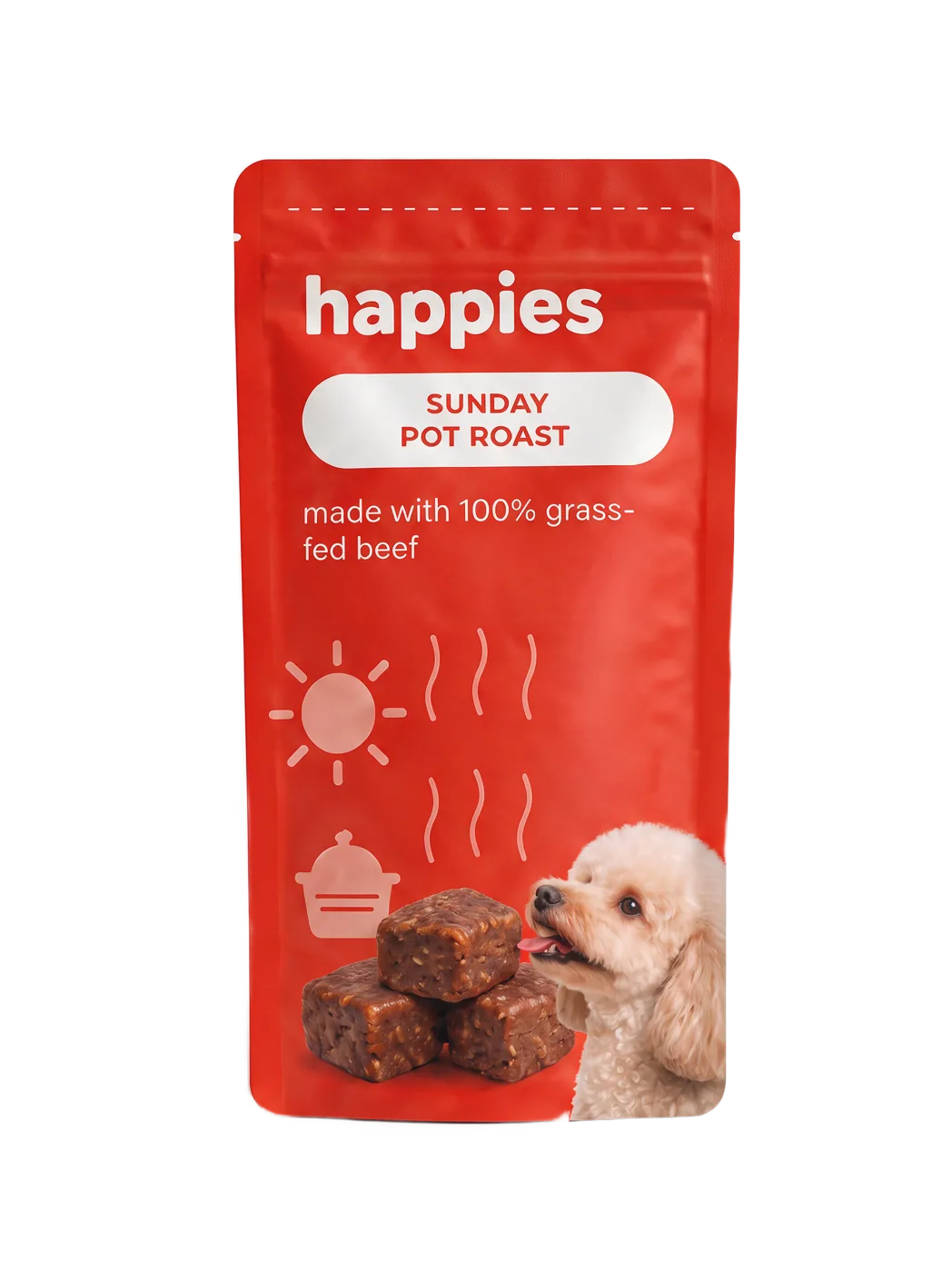
Pot roast bag rendered with a transparent background for the website
the same bag, three steps later, cut out for the website. same words, same shape, because of the sheet

One product first. I made five flavors because it's a demo and I was showing off. If it were real money, it's one bag until that bag is right.

// you'll know it worked whenSomeone sees the site and asks who your designer is.
// only doing one step?

Do 3.

Ten minutes in Claude Design with your screenshots. If the flat design comes back and you like it, you'll do the rest. If you don't, you saved yourself a month.

// straight talk

Design is the product. I learned that the expensive way.

I spent a day trying to describe a brand in words and letting cheap image tools guess. All of it went in the trash. The thing that worked was a human dumping pictures and picking for ten minutes, then giving the machines an exact drawing to obey. That ten minutes is the whole job. Everything else on this page is making sure the machines don't wander off from it.

// what changed
DateChange
Aug 27, 2026First version, written the day after the build from the studio notes and the cost sheet. Credit numbers are the real ones.
The 30-Day Challenge
// this is a build

The challenge is thirty of these, on your job.

The 30-Day Challenge is one real challenge a day, about 12 minutes each, for 30 days: an assistant that knows you, workflows for your job, systems for your life, your first agents. Seasons start a few times a year. The next start date and the current price are on the Challenge page.

$197 one-time · one Season · keep the lessons for good
Join the 30-Day Challenge →

Finish all 30, post your builds along the way, and if AI still isn't doing real work for you, email within 2 days of finishing for a full refund. Full terms in the FAQ.

// the letter

Not ready? Start free.

The Letter. Free, twice a month, written by me, zero hype. Plus a heads-up before each Season starts.

Copied