The page in your head.
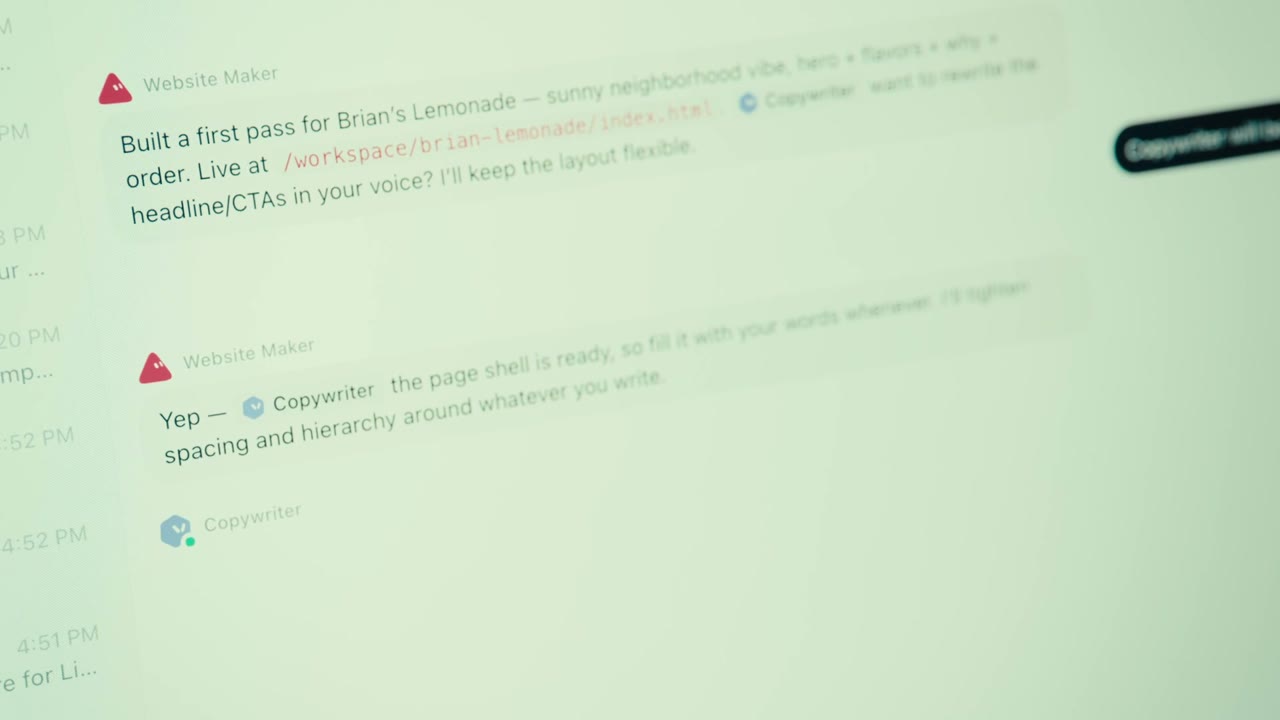
A page for your side project, an event, or a little shop idea. Ask one Bot for the page and another for the words. Review the first version before it goes live.
Finish line: a page draft you can open. WEBBLABSSTEP 00 / 06Join the 30-Day Challenge
 YOU COMMENTED KIRBY. YOU’RE IN.
Meet Grok Bot. Set up your first AI team. Then put it to work on an idea of your own.
Let’s build your first team ↓A content team you can use again.
Grok Bot is an app from the team behind Grok. A Bot is an AI teammate you give a job to. It can research, make files, use tools and pass work to other Bots.
You message the team, look at what it brings back, and make the call on what to use.
See the official Grok Bot overview for current features and access.
Research a topic.
Bring back the useful bits and links.
Turn an idea into a page.
Give you a first version to open.
Work on a draft.
Make the words sound like you.
Repeat a job on a schedule.
Bring you something to review.
You give it a topic. It finds three ideas, chooses the strongest, writes a short script and checks the claims. You’ll learn the setup once, then use the same shape for other jobs.
The screens below use the Mac app. On your phone right now? Save this page and open it beside Grok Bot when you’re ready.
Grok Bot requires an eligible plan. The official page currently lists Cursor Pro at $20/month and SuperGrok at $30/month with Bot access. Included usage has limits; extra usage can cost more. Check your existing plan before buying another.
For this first build, use public sources and draft work. You don’t need to connect your email. Bots share one computer, its files and its logins, so read permissions before adding private tools.
Make one Bot called Chief. You’ll give Chief the job of keeping the whole team on track.

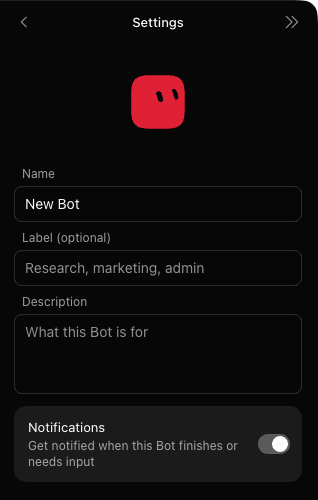
You are Chief, my content chief of staff. Your job is to coordinate a small team that returns three ranked video ideas and one checked, ready-to-record script for my niche.

Keep instructions beginner-friendly. Own the handoffs, preserve source links, and make the final result easy to review. Separate evidence, judgment and unknowns. Never say something was tested unless we actually tested it.

Use only public web pages and the brief I provide. Do not use existing private files, accounts or connected services. Do not buy, subscribe, send external messages, publish, change permissions, install software, delete files or create recurring tasks. Ask me before any additional access or cost. These boundaries apply to every specialist you create.

Do not start research yet. Confirm your job and wait for the team-creation prompt.
Chief coordinates. Four specialists handle the parts. You can see who did what.
Bring the sources.
Explain the choice.
Make it filmable.
Open the evidence.
Paste this into Chief’s chat. It asks Chief to create the four actual Bots, give them their jobs, and stop after setup.
Chief, create four persistent specialist Bots for this content team. Reuse an exact matching team member if one already exists; do not create duplicates. Give each the following job and the same public-only, draft-only boundaries in your own profile.

SCOUT: Research three distinct video ideas for the supplied niche and audience. For each, provide one specific hook, the viewer's practical takeaway, a visual demonstration we could film, and source links with publication/update dates where available. Prefer original documentation and first-hand evidence. Do not invent trends, statistics, quotes, features or source URLs. Report inaccessible sources.

SIGNAL: Rank the three ideas using audience relevance, hook clarity, strength of evidence and ease of demonstrating the payoff. Score each 0–5 per criterion with a short reason; 0 means absent, 3 usable with gaps, 5 strong and specific. Evidence is an eligibility gate: an unsupported central claim cannot win. These are editorial judgments, not probabilities of going viral. Suggest one honest hook improvement per idea.

SCRIBE: Turn the highest eligible idea into a 45–60 second spoken script for a beginner. Target 110–140 words, then estimate duration honestly. Use an immediate, specific hook, a clear demonstration, and a useful close. No invented personal experience or unsupported claims. Include a separate editor package: fact sheet with source links; HOOK/BODY/CLOSE with estimated timestamps; beat-by-beat visuals and on-screen text; editor notes with source links for real visual assets; a short description; and two alternate hooks. Do not pad the spoken script with directions or citations that would be read aloud. Reread it as a beginner scrolling in bed: remove generic AI phrasing and obvious advice, while keeping the evidence intact.

CHECK: Independently open the cited sources and check every factual claim in the script, including dates, prices, access limits and the hook. Use primary sources when possible. Return a table: claim, URL, evidence, checked date, supported/needs revision/unverified. Flag logical gaps, missing steps and a hook that promises more than the body delivers. You are an AI reviewer, not a guarantee of accuracy. Do not mark inaccessible evidence as verified.

Have each Bot acknowledge its job directly. Return the four actual Bot names and where to open them. If native Bot creation or messaging is unavailable, say exactly what failed; do not simulate a team conversation or claim completion. Stop after setup. Do not run the pipeline yet.
Ask which part failed. You can create each specialist with the same + flow from step 1, then paste that specialist’s role from the box above into its Description. Include Chief’s rules about public sources, drafts and asking before extra access or cost. This is a manual setup, and it still gives you the same team to work with.
A shared conversation lets you follow the work from idea to script.
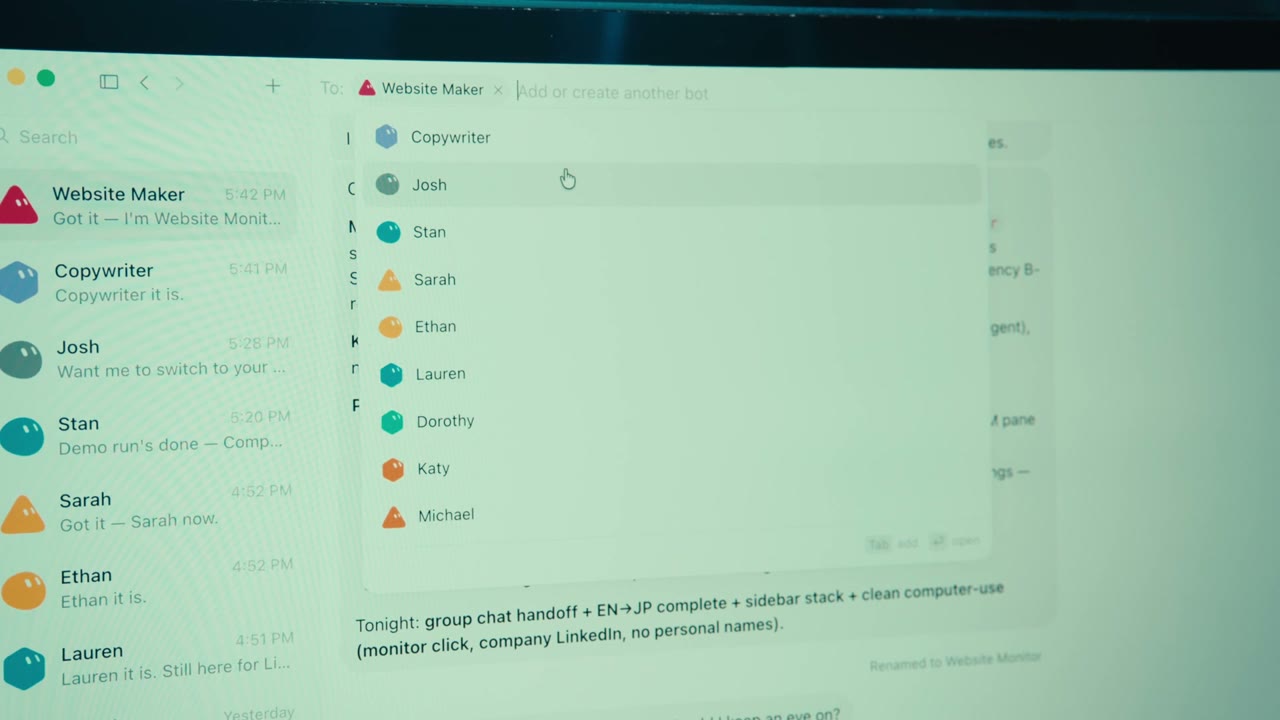
If the controls differ on your device, start in Chief’s own chat and ask how to add the team to one conversation. Use the Mac app for the click-by-click screens in this guide.
Pick a topic you already know a little about. The team will find three ways to teach it in a short video.
Keep this example or make it yours: meal prep, travel, a hobby, something from your job. These fields stay in this browser until you copy them.
The box below updates as you type. Copy it, address @Chief in Content Team, and send. Chief should hand the research to Scout first.
Chief, run one content cycle with Scout, Signal, Scribe and Check using this brief:
Niche: [YOUR NICHE]
Audience: [WHO YOU HELP]
Useful outcome: [WHAT THEY SHOULD BE ABLE TO DO]
Format: one 45–60 second vertical teaching video. Calm, specific language for beginners. No income promises, invented urgency or virality guarantees. Use current public sources and state today's date.

Own the routing. Scout researches three ideas and hands the source packet to Signal. Signal ranks them and sends the highest eligible idea plus evidence to Scribe. Scribe writes one script and sends it with the evidence to Check. Check must independently inspect the sources, not just agree with Scribe. Keep each handoff visible in the group, or link the actual messages if using direct Bot messages. Pass the actual brief and full evidence each time; do not assume another Bot sees your chat. Only the next owner should work.

Allow one repair pass from Scribe back to Check. If a critical claim remains unresolved, stop and label the result NOT READY with the specific blocker. Do not loop indefinitely. If research is inaccessible, tell me which public excerpts you need and label any resulting review source-limited. Do not claim live web verification without it.

Return one final packet: (1) three ranked ideas with reasons and links; (2) the chosen script as clean spoken text; (3) Scribe's complete editor package, separate from the script; (4) Check's claim table and actual handoff links or messages; (5) unresolved issues and what I should personally inspect. Revisit the ranking if fact-checking changes an idea's premise. Keep everything as a draft. Nothing publishes.
Let each handoff finish. If it stalls, ask Chief, “Who has the work now, and what do they need?” If you have to move messages between Bots yourself, keep the source links with them.
The useful part is the work you can inspect. Give the final packet one proper read.
Does it help the person in your brief? Can you show the payoff on camera?
Read the hook aloud. Open the source behind its main claim. Does the source actually say that?
Found a line that’s wrong or confusing? Replace the brackets with that exact line and send one focused correction.
Chief, fix only this issue in the current packet:
[PASTE THE EXACT CLAIM OR CONFUSING LINE AND WHAT IS WRONG]
Route the correction to the responsible specialist, then have Check verify the changed claim and its effect on the hook, story and ranking. One repair pass only. Preserve the previous version. Return the changed lines, their evidence and any remaining blocker. Do not quietly change the topic or mark unresolved claims ready.
Check is another AI, so it can make mistakes too. If the evidence still doesn’t support a claim, leave that line out or research it yourself before using the script.
You’ve done the setup once. Your next batch starts with a new brief.
Chief, reuse our existing team for one new content cycle with this updated brief:
Niche: [YOUR NICHE]
Audience: [WHO IT HELPS]
Useful outcome: [ONE THING THEY WILL BE ABLE TO DO]
Do not create duplicate Bots or a schedule. Refresh changing facts, compare against our last batch to avoid repeating ideas, and use the same handoffs, checking gate, one-repair limit and final packet. Public research and drafts only. Stop if additional access or cost is required.
That shape works far beyond content. Start with what you want finished. Add another Bot when there’s a real job for it.
The content team taught you the setup. The next job can come from your life. Start with a small version you can open, read or try.
A page for your side project, an event, or a little shop idea. Ask one Bot for the page and another for the words. Review the first version before it goes live.
Finish line: a page draft you can open.Give it your dates, budget and the kind of trip you like. Ask it to compare options and build an itinerary. Check prices and opening hours before you book.
Finish line: a plan with links to verify.Give five Bots different reader viewpoints. Let them poke holes in your page, post or presentation before you show it to people. Treat the responses as ideas to test with real people.
Finish line: three fixes, in order.Chief, before anything goes out, run a simulated reader review on it. These are AI viewpoints, not real customer research. Create five reviewer Bots (reuse them if they already exist, no duplicates): FIRST-TIMER (has never used this), SKEPTIC (assumes it will not work), BUSY READER (has a job and five minutes), BUDGET OWNER (pays for it), PAST BUYER (bought something like it before and was let down). Give every reviewer the draft below and the customer description. Each one answers, in their own voice: the three questions they would actually ask before saying yes; the one line that would make them stop reading; the one thing they would need to see. Short and blunt, no flattery. Then you compile one page: the questions I did not think to ask, the top three fixes in order, and the one thing to test first. Do not rewrite the draft yourself. Nothing is published. Same public-only, draft-only boundaries as always. Customer: [WHO THIS IS FOR, IN TWO LINES] Draft: [PASTE THE THING YOU ARE ABOUT TO SHIP]
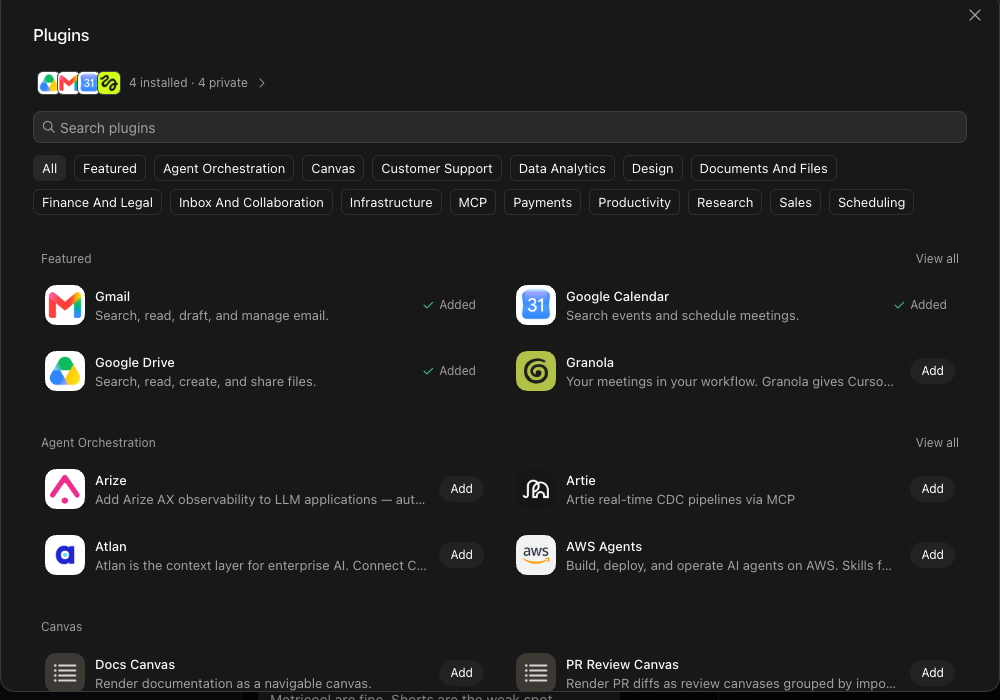
A plugin connects Grok Bot to another tool. Open Plugins, search for the tool you need, and read what access it asks for before connecting it.
You might ask for draft email replies, a summary of files you choose, or images for your project. Access and costs depend on the tool. Add one connection at a time and try a small job.
“Draft only” in a prompt is an instruction to the Bot, not a permission switch. Check the app’s actual controls too.
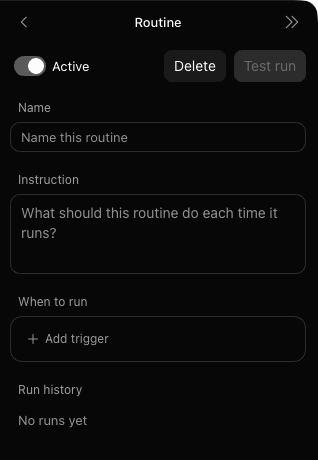
A routine runs a saved job on a schedule. Get a few good runs first. Then open the Bot’s routine panel, choose Create Routine, add a name and instruction, and choose when it should run.
Use Test run and inspect the result before leaving the routine active. Keep a recurring task small enough that you can review what it produces.
Reuse our existing content team for one new batch using the last approved brief. Refresh the sources and avoid repeating our previous ideas. Return three ranked ideas, one script, the editor package and Check's claim table. Keep the result as a draft for me to review.
Do not create more Bots, connect accounts, publish, send messages outside our team, buy anything or change permissions. Stop if the work needs extra access or cost. One repair pass only. Flag anything unresolved.
A page. A plan. A draft. A job you keep putting off. This prompt helps you shrink the idea into a first build you can finish.
Chief, help me turn this idea into one small build:
[DESCRIBE SOMETHING YOU WANT TO MAKE OR GET OFF YOUR PLATE]

Ask me up to three short questions, one at a time. Then propose: the finished thing I can open or inspect; the one Bot needed first; the extra specialist only if it helps; the inputs; and the check I should make before using the result.
Start with a small draft using public information and material I give you. Tell me if it needs a paid tool, a plugin, a private account or a step you cannot do. Do not connect, purchase, send, schedule or publish anything. Wait for me to approve the plan before building.
Learn Claude and ChatGPT with GPT-6 Astra from zero. Make videos in Higgsfield, build websites with Codex, and give Grok Bot a useful job. One build a day.
 Claude
 ChatGPT · GPT-6 Astra
 Higgsfield
 CodexGrok Bot
Claude + ChatGPT with GPT-6 Astra. Memory, projects, a website and a second brain.
Higgsfield, Codex and Grok Bot. Videos, websites, apps and agents.
Try it on your own. Keep what you made.
Full build-alongs, every prompt and every file in one place. Start from zero and keep this Season’s lessons for good.
Share your work with the cohort. Get an answer from the Desk within 24 hours when you get stuck.
8 ready-to-install assistants, your own finished builds, and a certificate for completing the Challenge.
Watching is free. Building is your choice. Every build shows its cost before you start. Some tools have separate paid plans. See the current Season, full details and completion guarantee on the Challenge page.